

This is an old revision of the document!
Gitflow

GitFLow is a fairly widespread organization of Git repositories that segregates things properly and therefore collaborates with a large number of people.
Dedicated tools for Git have been created to allow greater ease of work in merges, commit and passage between different branches.
If the organization of branches is common to all people using the repository, the use of GitFlow tools is by no means mandatory. You can easily navigate through a GitFLow managed repository using Git's simple tools. Or mix the two. Using dedicated tools is a personal choice, which will only affect your local repository. They were just designed to facilitate work in a such configuration.
Presentation
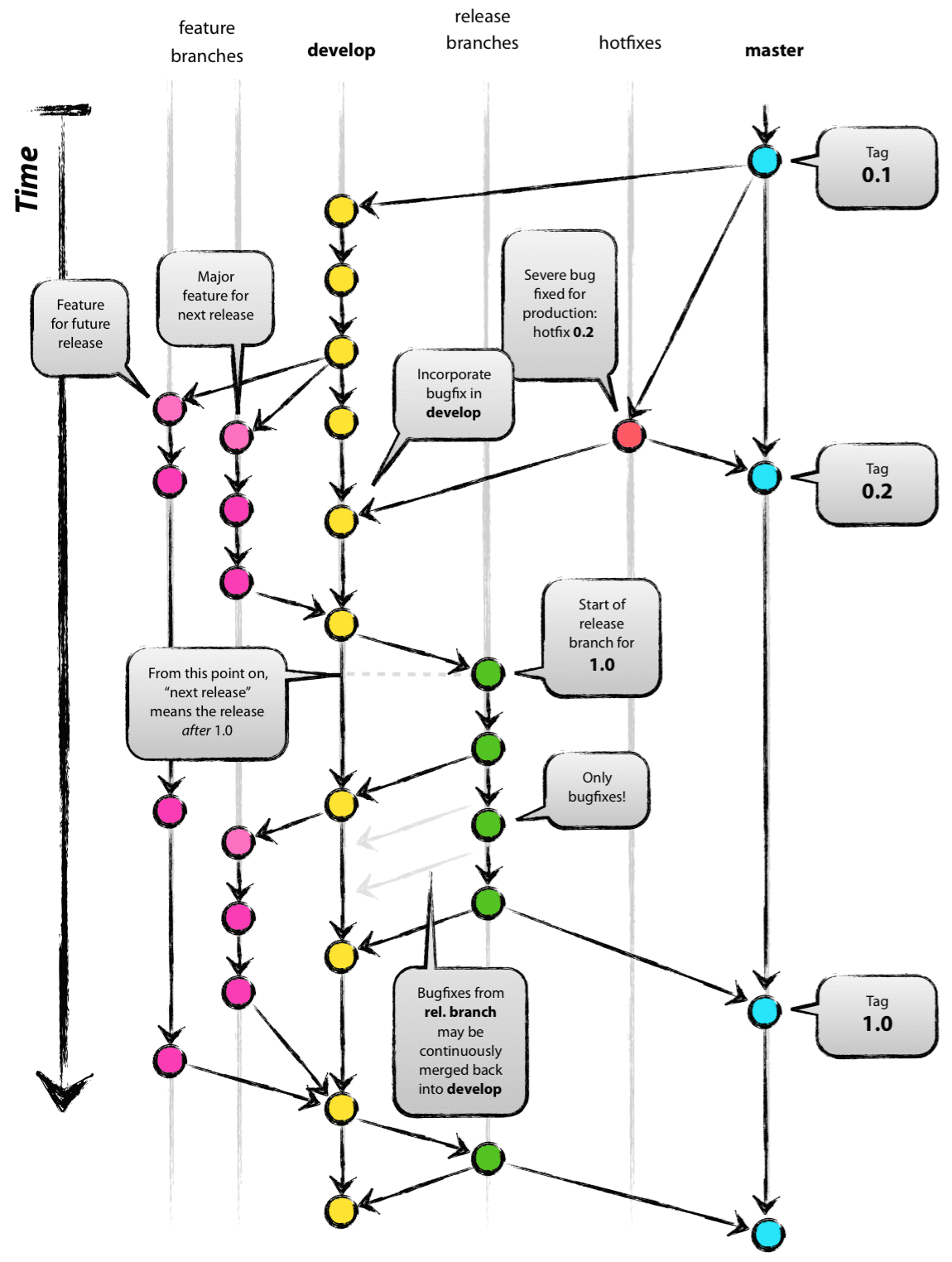
GitFlow is based on a clear hierarchy of branches, which avoids unwanted commits on the main branches. The idea is to make clear the addition of features, and to maintain stable states on the main branches.
There are generally several basic branches in a project managed according to the GitFlow model:
- Master branch, which production version;
- The Develop branch, which is the unstable version, but in a Debian-like sense: it's not the bazaar, it's just that it can sometimes have unexpected functioning… bugs can appear!
- Feature branches, each of which relates to the addition of a complex functionality(this may be related to a Issue, or even a set). After completing the work, we merge on Develop(and this automatically closes Issue if you commit correctly)
- A branch Release, which is a new branch, based on Develop, created when we think it mature for a new version of production. It only commits bug fixes. Once these are completed, one merges on the main branch, Master;
- Branches Hotfix that relate to the Master branch, when a bug has been detected and it is imperative to remedy it quickly. Once the solution is found, we merge the HotFix branch on the Master branch(and we include the patch in the Develop branch).
In image, this gives:
Video presentation

Grafikart offers a video of presentation of GitFlow, as always of excellent quality.
Sites ressource
- The original presentation article by the creator: http://nvie.com/posts/a-successful-git-branching-model/
- A presentation in French: http://www.synbioz.com/blog/git-adopter-un-modele-de-versionnement-efficace
- In image (and in French), the commands of the different stages: https://danielkummer.github.io/git-flow-cheatsheet/index.fr_FR.html#features


